

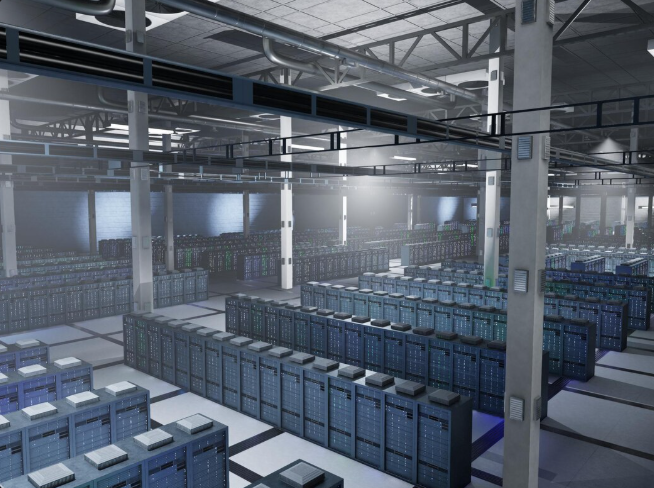
Cooling a computer room requires more precision than cooling a normal office space. Server rooms and IT environments generate large amounts of heat every hour. Without a reliable cooling system, equipment can overheat, slow down, or even fail completely. Businesses in Sterling, VA rely on specialized air handling solutions to keep their technology running safely and efficiently.
Computer room air handler units are designed to maintain the ideal temperature and humidity levels required for sensitive equipment. These systems help maintain stable airflow throughout the room while preventing hotspots around server racks and networking hardware. When cooling systems operate efficiently, businesses reduce downtime and improve operational reliability.
Modern facilities across Northern Virginia also focus on energy efficiency and regulatory compliance. Installing advanced cooling equipment helps organizations meet energy standards while maintaining performance. Many businesses combine air handler units with professional HVAC Installation services to ensure the system is designed correctly from the beginning.
A well designed cooling strategy protects critical infrastructure while supporting long term operational stability. With the right equipment and planning, computer rooms can remain cool, efficient, and fully compliant with commercial building requirements.
What Are Computer Room Air Handler Units (AHUs)?
Computer room air handler units are specialized HVAC systems designed to regulate environmental conditions inside server rooms and data centers. Unlike traditional HVAC units used in office spaces, these systems provide precise temperature and humidity control for sensitive electronic equipment. Maintaining consistent conditions helps protect servers, networking hardware, and storage devices from overheating.
These systems work by circulating conditioned air throughout the room while removing excess heat generated by equipment. Servers operate continuously and generate significant heat loads. Without proper airflow, certain areas of the room can develop hotspots that damage hardware and disrupt operations.
Advanced air handler units also support humidity management. Excess humidity can lead to condensation and corrosion inside equipment. Low humidity can increase the risk of static electricity, which may damage delicate components. Maintaining balanced humidity levels is essential for safe operation.
Modern systems can also integrate with building controls to monitor performance in real time. This allows facility managers to track temperature, humidity, and airflow while making adjustments automatically when needed.
Key Features of Computer Room AHUs
• Precise temperature and humidity control for server environments
• High airflow capacity to remove heat generated by equipment
• Variable speed fans that adapt to changing cooling loads
• Advanced filtration systems that improve air quality
• Energy efficient components designed for commercial facilities
• Compliance with regional energy and safety regulations
These features help ensure reliable cooling performance while protecting sensitive IT infrastructure.
How to Choose the Best Air Handler Units for Computer Rooms
Choosing the right air handler unit requires careful evaluation of the facility and its cooling needs. Each computer room has different requirements depending on the number of servers, equipment layout, and overall heat output. A properly sized system ensures efficient cooling without wasting energy.
Professional HVAC technicians begin by analyzing the room’s cooling load. This includes calculating heat produced by servers, networking hardware, and power supplies. Once the cooling demand is identified, engineers can determine the appropriate capacity for the air handler unit.
Airflow distribution is another critical factor. Poor airflow can cause uneven cooling, leaving some equipment areas vulnerable to overheating. Correct placement of air handlers and vents ensures consistent air circulation throughout the room.
Businesses also benefit from combining air handler systems with reliable HVAC Maintenance programs. Regular inspections keep systems operating at peak efficiency while preventing unexpected failures.
Step by Step Selection Tips
• Assess Cooling Load
Calculate the total heat generated by servers and networking equipment to determine required cooling capacity.
• Evaluate Airflow Requirements
Ensure the air handler can deliver enough airflow to eliminate hotspots within the server room.
• Check Filtration Systems
High quality filters help remove dust and airborne contaminants that may damage equipment.
• Plan for Redundancy
Many facilities install backup cooling systems to prevent downtime if one unit fails.
• Consider Energy Efficiency
Modern units with variable speed fans and smart controls reduce electricity usage.
These steps help businesses choose a cooling system that supports both reliability and long term efficiency.
Benefits of Energy Efficient Computer Room Air Handlers
Energy efficiency is an important factor for facilities that operate computer rooms and data centers. Cooling equipment often runs twenty four hours a day, which means electricity consumption can become a major expense. Modern air handler units are designed to reduce energy usage while maintaining precise environmental control.
One key benefit is reduced operating costs. Advanced fans and smart control systems adjust cooling output based on real time demand. When server loads decrease, the system automatically reduces power consumption. This helps businesses lower monthly utility bills.
Energy efficient systems also reduce wear on HVAC components. When equipment operates at optimal levels instead of maximum capacity all the time, mechanical parts last longer. This results in fewer repairs and lower maintenance costs over time.
Organizations that implement advanced cooling systems often rely on integrated commercial HVAC Solutions to improve both performance and efficiency across their facilities.
Pros of Energy Efficient AHUs
• Lower energy consumption and reduced utility bills
• Longer lifespan for HVAC equipment
• Improved air quality within the facility
• Reduced risk of overheating for sensitive technology
• Better compliance with regional energy regulations
• Lower maintenance and repair costs
Businesses that invest in efficient cooling infrastructure often experience better performance and long term savings.
Local Case Study: Efficient Cooling at a Sterling Data Center
A growing technology company in Sterling faced serious cooling challenges inside its data center. As new servers were added, the existing HVAC system struggled to maintain consistent temperatures. Certain areas of the room developed hotspots that placed critical equipment at risk.
Our team conducted a detailed evaluation of the facility to understand its cooling requirements. We analyzed the server heat load and studied airflow patterns within the room. Based on this analysis, we designed a customized air handler system tailored to the facility’s needs.
The new system included advanced air handler units equipped with variable frequency drives and intelligent humidity controls. These features allowed the cooling system to automatically adjust airflow and temperature levels depending on equipment demand.
After installation, the facility experienced a significant improvement in cooling performance. Energy consumption dropped by nearly twenty five percent while maintaining stable temperatures across the entire data center. Ongoing support through professional HVAC Repair services ensures the system continues operating reliably.
This project demonstrates how the right HVAC strategy can improve both efficiency and system stability for technology facilities.
Conclusion
Reliable cooling systems are essential for businesses that operate computer rooms and data centers. Air handler units provide the precise temperature and humidity control required to protect sensitive equipment. Without proper cooling infrastructure, organizations risk system failures, equipment damage, and costly downtime. Businesses looking to upgrade their systems can explore our HVAC installation services in Sterling, VA to ensure dependable cooling for critical environments.
Modern computer room air handler units improve both performance and efficiency. Businesses in Sterling and across Northern Virginia benefit from systems that reduce energy consumption while maintaining stable operating conditions. Professional installation, maintenance, and repair services ensure that these systems continue operating reliably.
Investing in advanced cooling technology helps organizations protect their critical infrastructure while reducing long term operational costs.
Contact Arminco Air for Expert Computer Room Cooling Solutions
Reliable cooling is essential for protecting your technology infrastructure, especially in commercial facilities and data environments where temperature control is critical. Our team provides professional HVAC solutions designed to maintain stable conditions and support the performance of your equipment. From system installation to upgrades, we focus on dependable cooling that meets the demands of modern IT spaces. Request a Quote today to learn how our experts can help improve the efficiency and reliability of your cooling system.
Service Areas
Sterling, Ashburn, Reston, Herndon, Leesburg, Manassas, Alexandria, Arlington, Fairfax, Washington DC
Frequently Asked Questions
1. What maintenance do computer room air handler units require?
Computer room air handler units require routine inspections to maintain optimal performance. Filters should be replaced regularly to maintain airflow and air quality. Technicians also clean coils and inspect fans to prevent dust buildup. Preventive maintenance every three to six months helps detect issues early and avoid system failures.
2. Can computer room AHUs connect to building management systems?
Yes. Modern air handler units can integrate with building management systems. This allows facility managers to monitor temperature, humidity, and system performance in real time. Automated alerts help teams respond quickly to any changes in environmental conditions.
3. How does Virginia climate affect cooling system selection?
Virginia experiences warm summers and periods of high humidity. Because of this, computer room cooling systems must provide strong dehumidification capabilities along with precise temperature control. Energy recovery systems can also help improve efficiency in this climate.
4. What is the average lifespan of a commercial air handler unit?
With proper maintenance, commercial air handler units typically last between fifteen and twenty years. Regular servicing, filter replacement, and system monitoring help extend equipment lifespan.
5. Do HVAC companies provide emergency repair services?
Yes. Many commercial HVAC providers offer emergency services to quickly address unexpected cooling failures. Rapid response helps prevent equipment overheating and operational downtime in data centers.